
What are the best PC fans for optimal cooling performance?
Upload time :December 4, 2023
Shares
Reads
When it comes to keeping your PC running smoothly, choosing the right fans can make all the difference. Optimal cooling performance is key to ensuring your hardware stays cool and runs efficiently, which is why it's important to invest in the best PC fans. There are a variety of top-rated brands on the market that offer high-quality fans designed for maximum cooling performance. In addition to performance, you'll also want to look for fans that operate quietly to minimize noise pollution. For ease of installation, consider purchasing fans that come with simple attachment mechanisms, such as clips or screws. By choosing the right PC fans, you can keep your system running smoothly and extend the life of your hardware. Whether you're building a new PC or upgrading your existing setup, investing in high-quality fans is a smart choice.
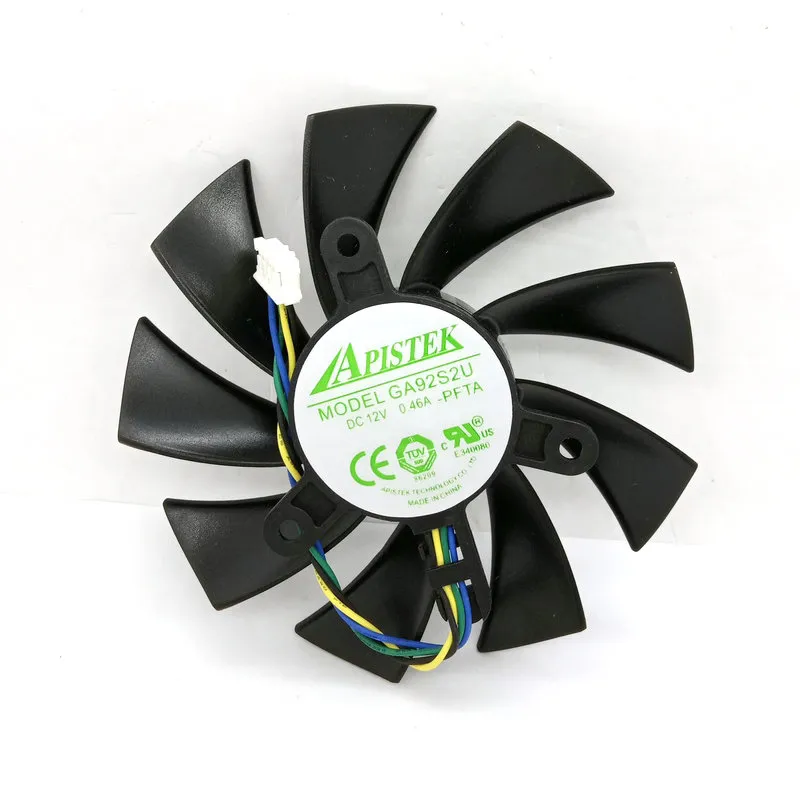
Buy Now
See More: Wholesale Products
1. Optimal cooling performance.
Here are some tips on choosing the best PC fans for optimal cooling performance:
1. Size Matters
The size of the fan is an essential factor in determining its cooling capabilities. The most common fan sizes are 80mm, 120mm, and 140mm. Generally, larger fans can move more air while spinning at a lower speed, resulting in less noise. That being said, there are also high-quality fans available in smaller sizes that pack a punch in terms of airflow.
2. Airflow and Static Pressure
When considering a fan's airflow, you want to look for CFM (cubic feet per minute). CFM refers to the amount of air that the fan can move in a given time. A higher CFM means better airflow. However, you also want to consider static pressure, which is how well the fan can push air through obstacles like a radiator or heatsink.
3. Bearing Type
The bearing type used in the fan determines its longevity and noise level. Some of the most common types of bearings include sleeve bearings, ball bearings, and fluid dynamic bearings. Sleeve bearings are the most affordable but tend to have shorter lifespans, while ball bearings and fluid dynamic bearings are more durable and quieter.
4. Noise Level
The noise level produced by a fan is measured in decibels (dB). Fans with higher RPMs generally produce more noise, so it's essential to find a balance between noise level and cooling performance. Look for fans with low noise levels if you prioritize silence or invest in a fan controller that allows you to adjust their speeds manually.
5. RGB Lighting
RGB lighting has become a popular feature among PC enthusiasts. While it doesn't affect cooling performance, it adds a unique touch to your build. If you're interested in adding RGB fans to your system, make sure they come from reputable brands that don't compromise on quality.
Some of the Best PC Fans for Optimal Cooling Performance
1. Noctua NF-A14 PWM Chromax Black Swap
Noctua is known for producing some of the best fans in the market, and the NF-A14 PWM Chromax Black Swap is no exception. This fan has a maximum airflow of 140.2 CFM and a static pressure of 2.08mm H₂O, making it ideal for use in radiators and heatsinks. It also operates quietly, thanks to its SSO2 bearing and anti-vibration pads. Plus, its black color scheme adds a sleek touch to your build.
2. be quiet! Silent Wings 3
As its name suggests, the be quiet! Silent Wings 3 is an excellent choice for those who prioritize silence. Despite its low noise level of 16.4 dB(A), this fan can move up to 73.33 CFM of airflow and has a static pressure of 1.79mm H₂O. It uses a six-pole motor and fluid dynamic bearings for superior durability, and its all-black design fits well with most builds.
3. Corsair ML120 PRO RGB
If you're looking for a fan that combines both performance and aesthetics, the Corsair ML120 PRO RGB might be worth considering. Its magnetic levitation bearing ensures quiet operation and long lifespan, while its RGB lighting adds a pop of color to your build. It can reach a maximum airflow of 75 CFM and has a static pressure of 0.2-4.2 mm H₂O, making it suitable for use in various scenarios.
4. Arctic P12 PWM PST
The Arctic P12 PWM PST is an affordable yet reliable option for those on a budget. It has a maximum airflow of 56.3 CFM and a static pressure of 2.2mm H₂O, and uses a dual-ball bearing mechanism for increased durability. It also features PWM sharing technology, which allows multiple fans to operate in sync, reducing noise levels.
2. Best PC fans.
Before we get started, it is essential to understand the different types of fans available in the market. The two main types of fans are air-based and liquid-based fans. Here, we will focus on air-based fans as they are more commonly used in PC builds.
1. Noctua NF-A12x25
The Noctua NF-A12x25 is one of the best PC fans available in the market today and is perfect for anyone looking for a high-performance fan. This fan has been designed to offer an excellent balance between noise and performance, making it ideal for gamers who want their PC to be as quiet as possible. The NF-A12x25 has a unique design that allows it to move large volumes of air while maintaining low noise levels.
The fan's blades have a sophisticated aerodynamic design, which helps it to generate more airflow while using less power. The fan also features anti-vibration pads that help to reduce any noise generated by vibrations. Additionally, the fan uses a magnetic bearing, which eliminates any friction between moving parts, making it more durable and long-lasting.
2. Corsair LL Series LL120 RGB
The Corsair LL Series LL120 RGB fan is another excellent option for gamers looking for a high-performance fan with RGB lighting. This fan offers a perfect balance between aesthetics and performance, making it an excellent choice for anyone looking to build a gaming PC with style.
The LL120 RGB fan features 16 individually addressable RGB LEDs that can be customized to match your build's color scheme. The fan's blades are designed to provide excellent airflow while maintaining low noise levels. The fan also features a hydraulic bearing, which helps to reduce noise while improving durability.
3. Be Quiet! Silent Wings 3
If you're looking for a fan that prioritizes silence above all else, then the Be Quiet! Silent Wings 3 is the fan for you. This fan offers excellent noise reduction capabilities while still providing adequate airflow to keep your PC components cool.
The Silent Wings 3 fan features a unique six-pole motor design that helps to reduce vibration and noise levels. The fan also uses a fluid-dynamic bearing that provides better lubrication and reduces friction, which helps to increase its lifespan. Additionally, the fan's blades have a funnel shape that helps to improve airflow while reducing turbulence and noise.
4. Cooler Master MF120R ARGB
The Cooler Master MF120R ARGB fan is an excellent option for gamers looking for a fan with RGB lighting and high-performance capabilities. This fan features dual-looped RGB lighting that can be customized to match your build's color scheme.
The MF120R ARGB fan's blades have a unique design that helps to improve airflow while maintaining low noise levels. The fan also features a hybrid design that combines both a sleeve and ball bearing, which helps to reduce noise and improve durability.
5. Thermaltake Riing Plus 12 RGB
The Thermaltake Riing Plus 12 RGB fan is another fantastic option for gamers looking for a fan with RGB lighting and high-performance capabilities. This fan offers excellent illumination capabilities, with 16.8 million colors and 12 controllable LEDs.
The Riing Plus 12 RGB fan's blades have a unique design that helps to improve airflow while reducing noise levels. The fan also features a hydraulic bearing that provides better lubrication and reduces friction, which helps to increase its lifespan.
Conclusion
3. Top-rated brands.
So what are the best PC fans for optimal cooling performance? Let's take a look at three top-rated brands.
1. Noctua
Noctua is widely regarded as one of the premier manufacturers of PC fans. The company's fans are known for their quiet operation, efficient cooling, and high build quality. Noctua offers a wide range of fan sizes, including 120mm and 140mm models, as well as specialized models designed for use with water cooling systems.
One of the key features of Noctua fans is their unique blade design. The company's fans use a series of curved blades that are designed to optimize airflow and minimize noise. In addition, Noctua fans incorporate advanced bearing technology, which helps to reduce friction and extend the life of the fan.
If you're looking for a high-quality PC fan that will provide excellent cooling performance without adding excessive noise to your setup, Noctua is definitely worth considering.
2. Corsair
Corsair is another well-respected name in the world of PC fans. The company offers a wide range of fan sizes and styles, including RGB fans that allow you to customize the color and lighting effects of your setup.
Corsair fans are known for their high airflow rates, which make them ideal for use in gaming PCs and other systems that generate a lot of heat. The company's fans also incorporate advanced hydraulic bearing technology, which helps to reduce noise and improve durability.
One of the standout features of Corsair fans is their customizable lighting. With the company's iCUE software, you can control the color and lighting effects of your fans, creating a personalized look that matches your setup.
Overall, if you're looking for a versatile, high-performance PC fan that lets you add some personality to your system, Corsair is definitely worth checking out.
3. Be Quiet!
Be Quiet! is a German company that specializes in producing ultra-quiet PC components, including fans, power supplies, and CPU coolers. The company's fans are among the quietest on the market, making them an ideal choice for users who value silence over raw cooling power.
Be Quiet! fans feature advanced blade designs that help to reduce turbulence and minimize noise. The company also uses high-quality materials, such as fluid-dynamic bearings and rubberized mounting systems, to further reduce noise and vibration.
In terms of actual cooling performance, Be Quiet! fans may not match the raw power of some other brands. However, if you're more concerned about keeping your system quiet than pushing it to its absolute limits, Be Quiet! fans are definitely worth considering.
Final Thoughts
4. Quiet operation.
One of the key factors in selecting PC fans is quiet operation. While cooling performance is important, a loud fan can be distracting or even annoying. Here are some of the best PC fans for optimal cooling performance that also operate quietly.
1. Noctua NF-S12B redux-1200 PWM
The Noctua NF-S12B redux-1200 PWM is an excellent choice for those seeking a balance between cooling performance and quiet operation. This fan has a maximum noise level of only 18.1 decibels (dB) and can move up to 100.6 cubic feet per minute (CFM) of air. It's also reasonably priced at around $14.
2. be quiet! Silent Wings 3
As the name suggests, the be quiet! Silent Wings 3 is designed for quiet operation. This fan has a maximum noise level of only 15.5 dB and can move up to 59.5 CFM of air. It's slightly more expensive than the Noctua NF-S12B redux-1200 PWM, but its reputation for quiet operation makes it worth the extra cost.
3. Corsair ML120 Pro LED
The Corsair ML120 Pro LED is a great option for those who want both cooling performance and aesthetics. This fan features customizable LED lighting and can move up to 75 CFM of air. It's also relatively quiet, with a maximum noise level of 25 dB. The downside is that it's one of the more expensive options on this list, costing around $30.
4. Cooler Master SickleFlow 120 V2 RGB
If you're looking for a budget-friendly option that still offers good cooling performance and quiet operation, the Cooler Master SickleFlow 120 V2 RGB is worth considering. This fan costs around $20 and can move up to 62 CFM of air. It's also relatively quiet, with a maximum noise level of 27 dB.
When selecting a PC fan for quiet operation, it's important to consider not just the maximum noise level but also the type of noise it produces. A high-pitched whine can be more annoying than a low-frequency hum, for example. Some fans also produce clicking or rattling sounds, which can indicate a defect or poor quality.
In addition to selecting a quiet fan, there are other steps you can take to reduce noise from your PC. One option is to use rubber grommets or screws to mount the fan, which can help reduce vibrations. Another option is to use a fan controller to adjust the speed of the fan based on temperature, which can help keep noise levels down when the PC is idle.
5. Easy installation.
1. Noctua NF-A14 PWM
The Noctua NF-A14 PWM is widely regarded as one of the best PC fans on the market. It's incredibly quiet, yet still manages to move a lot of air. Its anti-vibration pads help prevent noise from resonating through your PC case, and its six-year warranty ensures that you're getting a quality product. The Noctua NF-A14 PWM also features easy installation, thanks to its included mounting brackets and screws.
2. Corsair ML120 Pro LED
The Corsair ML120 Pro LED is another fantastic option for PC cooling. Its magnetic levitation technology allows it to be incredibly quiet while still moving a lot of air. It also features customisable LED lighting, making it a great choice for gamers who want to add some flair to their build. The Corsair ML120 Pro LED is easy to install, with both mounting screws and rubber corners included.
3. be quiet! Silent Wings 3
If you're looking for a fan that lives up to its name, the be quiet! Silent Wings 3 is a great choice. This fan is virtually silent, yet still manages to provide excellent airflow. Its unique blade design helps reduce turbulence, further reducing noise. The be quiet! Silent Wings 3 also features an easy-to-install mounting system, with both push pins and screws included.
4. Fractal Design Venturi HF-14
The Fractal Design Venturi HF-14 is a high-performance fan that delivers excellent cooling power. Its aerodynamic design helps increase static pressure, making it ideal for use in water-cooling radiators. The Fractal Design Venturi HF-14 is also incredibly quiet, making it a great choice for those who value silence. Installation is a breeze, with both screws and rubber mounting corners included.
5. Cooler Master MF120R ARGB
The Cooler Master MF120R ARGB is a fantastic option for those looking to add some RGB lighting to their build. This fan features addressable RGB LEDs, allowing you to customise the lighting to suit your style. The Cooler Master MF120R ARGB is also a great performer, with excellent cooling power. Its easy-to-install mounting system makes it a breeze to install, with both screws and rubber mounting corners included.
In conclusion, when it comes to PC fans, there are many factors to consider. When choosing a fan for optimal cooling performance, pay attention to noise levels, airflow, and static pressure. Easy installation is also important, as it can save you time and frustration during the building process. Overall, any of the five fans listed above would make a great addition to your PC build.
Recommended related content
What are the Best Women's Flip Flops for Summer?
What Are the Best Hobo Bags for Everyday Use?
What are the latest trends in women's gold rings?
