
What Are Case Fans for PC and How Do They Work?
Upload time :November 21, 2023
Shares
Reads
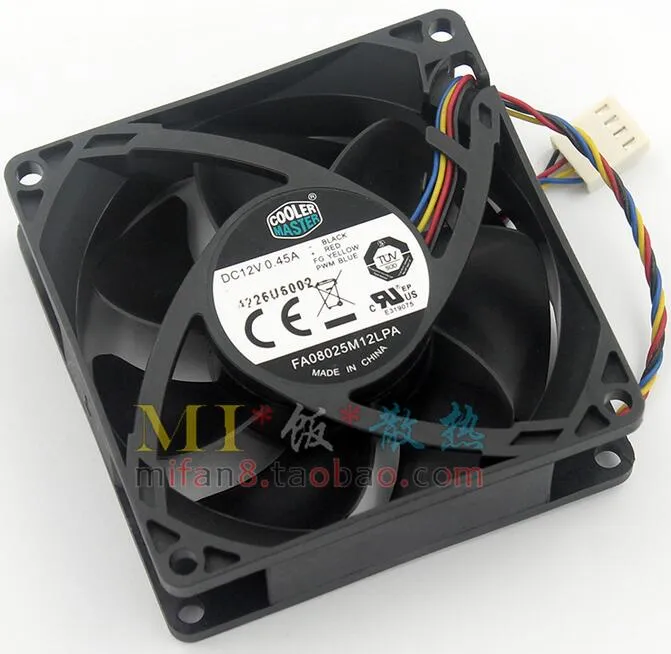
Case fans are a crucial component of any PC build that helps to keep the system cool and prevent overheating. In essence, case fans are small electric motors with blades that help circulate air inside the computer case, which in turn helps to dissipate heat generated by various components such as the CPU and GPU. Proper cooling is essential for ensuring the optimal performance and longevity of these components, which can get damaged if exposed to excessive heat.
Buy Now
See More: Wholesale Products
There are several types of case fans available in the market, including 120mm and 140mm variants that differ in size and performance. Some of the popular types also include PWM fans, RGB fans, and high airflow fans, each with their unique features and benefits. Regular maintenance and cleaning of case fans are essential to maintain their efficiency and lifespan, while troubleshooting tips can help address common issues such as fan noise or failure.
Overall, understanding case fans and their working mechanism is critical for anyone looking to build or upgrade a PC that delivers exceptional performance and durability.
1. Definition of case fans for PCs
Definition of Case Fans for PCs
A case fan is a device that is installed inside a computer case to circulate air and improve the airflow around the components. It works by drawing in cool air from outside the case and blowing it over the hot components, which helps to dissipate the heat. The hot air is then expelled out of the case through vents or other openings, creating a continuous flow of cool air into the case.
Case fans come in different sizes, shapes, and designs, and they can be classified based on their size and the type of bearing used. The most common sizes are 80mm, 120mm, and 140mm, but there are also larger and smaller ones. The type of bearing used determines the fan's noise level, lifespan, and performance. The most common types of bearings used in case fans are sleeve bearings, ball bearings, and fluid dynamic bearings.
How Do Case Fans Work?
Case fans work by creating airflow inside the case, which helps to dissipate the heat generated by the components. They draw cool air into the case through vents or other openings and direct it towards the hot components, such as the CPU, GPU, and power supply. The cool air absorbs the heat from the components and becomes warm, which is then expelled out of the case through exhaust vents or other openings.
The direction of the airflow is critical, and it should be set up in a way that ensures maximum cooling effectiveness. There are two ways to set up the airflow inside a case: positive pressure and negative pressure.
Positive pressure means that there is more air entering the case than leaving it, which creates a higher pressure inside the case. This setup is ideal for reducing dust buildup and improving overall cooling efficiency. By creating a positive pressure inside the case, the air is forced out of every available opening, including small cracks and gaps, preventing dust from settling on the components.
Negative pressure means that there is more air leaving the case than entering it, which creates a lower pressure inside the case. This setup can be effective for removing hot air quickly, but it can also draw in dust and debris through any available opening, including unfiltered areas.
To achieve the best results, a combination of positive and negative pressure can be used. Usually, the front and bottom fans are used for intake, while the back and top fans are used for exhaust. This setup ensures a steady flow of cool air throughout the case and expels hot air efficiently.
Benefits of Using Case Fans
Using case fans in a PC build offers several benefits, including:
1. Improved Cooling Performance: Case fans help to dissipate the heat generated by the components, which improves the overall cooling performance of the system.
2. Longer Lifespan for Components: High temperatures can shorten the lifespan of components such as the CPU and GPU. By using case fans, these components can stay cooler, which helps to extend their lifespan.
3. Reduced Noise Levels: When components get too hot, the fans in them have to spin faster, which increases noise levels. By using case fans, the overall temperature of the system can be kept lower, reducing the need for the fans in the components to work harder.
4. Lowered Risk of Malfunctions: When components get too hot, they can malfunction or even fail completely. By using case fans, the risk of this happening is significantly reduced.
Conclusion
2. Importance of cooling for PC components
Importance of Cooling for PC Components
The CPU (Central Processing Unit) is one of the most important parts of a PC, and it generates a lot of heat when in use. If left unchecked, this heat can cause damage to the CPU, which may result in slower performance or even complete failure. The same is true of the graphics card, which is also a critical component in gaming and video editing tasks. Other parts that generate heat include the power supply unit, hard drives, and RAM.
Cooling is therefore an essential aspect of any PC system to ensure that these components operate within their optimal temperature range. While some PC cases come with built-in fans, others require additional fans to achieve this goal.
Case Fans and How They Work
Case fans work by drawing in cool air from outside the computer case and expelling hot air out of it. This action helps to maintain the overall temperature of the PC components at a safe level. The number and type of fans required depend on the size and configuration of the PC case, as well as the specific components installed within it.
There are two main types of case fans: air-based and liquid-based. Air-based fans are the most common type and work by using blades to circulate air around the components. These fans can be further divided into axial fans and centrifugal fans. Axial fans draw in air parallel to their axis, while centrifugal fans draw it perpendicular to their axis.
Axial fans are generally more efficient than centrifugal fans and produce less noise. However, centrifugal fans are better suited for higher static pressure environments, such as when air needs to be moved through small openings or tight spaces.
Liquid-based cooling systems work by circulating coolant through dedicated tubes that run alongside the components. The coolant absorbs heat from the components and is then transported to a radiator where it is cooled by air or water before being circulated back to the components.
While liquid-based cooling systems are generally more expensive than air-based systems, they offer superior cooling performance, especially in high-end gaming or workstation PCs. They also produce less noise compared to air-based systems and can be customized with colorful liquid coolant to give your PC a unique look.
Conclusion
In conclusion, cooling is an essential aspect of any PC system to ensure that the components operate within their optimal temperature range. Case fans are an effective and cost-efficient way of achieving this goal, as they help to draw in cool air and expel hot air out of the computer case.
When choosing case fans, consider factors such as airflow rate, fan size, and noise production. Remember to also factor in the size and configuration of your PC case, as well as the specific components installed within it.
3. How case fans work
What are Case Fans for PC?
Case fans are an integral part of any computer build. As the name suggests, they are fans that are installed inside the computer case to keep the internal components cool. They help in removing hot air from the case and replace it with cooler air from outside to maintain a steady temperature inside the computer.
Why Are Case Fans Important?
Overheating is one of the most significant issues faced by computers. When the internal components of a computer get too hot, they can slow down or even stop functioning altogether. This can lead to data loss, hardware failure, and other issues.
Case fans help prevent overheating by ensuring that the internal components of the computer stay cool. They work in conjunction with other cooling components such as CPU and GPU coolers to provide optimal cooling performance to the computer.
How Case Fans Work?
Now that we know what case fans are and why they are important, let's take a look at how they work.
1. Airflow Direction
The first thing to consider when installing case fans is the airflow direction. The two most common directions are intake and exhaust. Intake fans draw cool air from outside into the case, while exhaust fans push hot air out of the case. It's essential to have a balance between intake and exhaust fans to ensure that there is enough airflow within the case.
2. Fan Size
The next thing to consider is the size of the fan. Case fans come in different sizes, with the most common being 120mm and 140mm. The size of the fan determines how much air it can move, and larger fans typically provide better cooling performance.
3. Fan Speed
The speed of the fan is another crucial factor. It is measured in rotations per minute (RPM), and higher RPM means more airflow. However, higher RPM also means more noise, so it's essential to strike a balance between cooling performance and noise level.
4. Fan Bearings
There are three types of fan bearings - sleeve, ball, and fluid dynamic bearing (FDB). Sleeve bearings are the cheapest but have the shortest lifespan and are prone to failure. Ball bearings are more expensive and have a longer lifespan, but they tend to be noisier. FDB bearings are the most expensive but offer the best balance between lifespan, noise level, and performance.
5. PWM vs. DC Fans
Finally, you should consider whether you want a PWM or DC fan. PWM fans use pulse-width modulation to control fan speed, while DC fans adjust the voltage supplied to the fan to regulate speed. PWM fans are more efficient and quieter, but they are also more expensive.
Conclusion
4. Types of case fans
If you're an avid PC user, chances are you've heard of case fans. They're the unsung heroes of any computer setup, responsible for keeping your components cool and preventing overheating. But what exactly are case fans, and how do they work? In this article, we'll explore the basics of case fans, their types, and their function in your PC.
Firstly, let's define what a case fan is. Simply put, it's a small electronic device that circulates air inside your computer case. This helps to dissipate the heat generated by your CPU, graphics card, power supply, and other components. Without proper cooling, these parts can overheat and cause damage, resulting in reduced performance or even system failure.
A case fan typically consists of three main parts: the motor, the blades, and the frame. The motor is the power source that drives the rotation of the blades, which move the air. The frame holds the motor and blades in place and has mounting holes for attaching the fan to your case.
Now, let's look at the different types of case fans available on the market:
1. Exhaust Fans
As the name suggests, exhaust fans are designed to expel hot air from your case. They're usually located at the rear or top of your case, where hot air naturally rises. By pushing out this air, exhaust fans create a negative pressure inside the case, which draws in cooler air from outside. This helps to maintain a steady airflow and prevent the buildup of heat.
2. Intake Fans
Intake fans are the opposite of exhaust fans - they draw in cool air from outside and direct it towards your components. They're usually located at the front or bottom of your case, where cool air enters. By providing a fresh supply of cool air, intake fans help to reduce the temperature of your components and prevent them from overheating.
3. Radiator Fans
Radiator fans are a type of fan that's specifically designed for use with water-cooling systems. They're attached to the radiators that cool the water, and their job is to move air through the fins of the radiator to dissipate the heat. Radiator fans come in various sizes and speeds, depending on the size and complexity of your water-cooling setup.
4. Hybrid Fans
Hybrid fans are a newer type of fan that combines the features of exhaust and intake fans. They have reversible blades that can change direction to either push air out or pull air in, depending on your needs. Hybrid fans are versatile and can be used in various configurations to suit your setup.
So, now that we know the different types of case fans, how do they work together to keep your PC cool? Well, it all comes down to airflow. Ideally, you want to create a smooth and steady flow of air that passes over all your components and carries away the heat. To achieve this, you need to balance the number and placement of your case fans.
For example, if you have two exhaust fans at the back and top of your case, you'll want to add one or two intake fans at the front or bottom to provide a fresh supply of cool air. This will create a predictable airflow pattern that draws cool air in, directs it towards your components, and then expels the hot air out.
You'll also want to consider the speed and noise level of your case fans. Faster fans can move more air and provide better cooling, but they're also louder. Quieter fans are less intrusive, but they may not be as effective at cooling. It's a balancing act between performance and acoustics, so choose your fans wisely.
5. Maintenance and troubleshooting tips
There are several types of case fans, including axial, centrifugal, and hybrid fans. Axial fans are the most common type and have blades that rotate around an axis to push air in a straight line. Centrifugal fans, on the other hand, have curved blades that draw air in and then force it out in a perpendicular direction. Hybrid fans combine the features of both axial and centrifugal fans for better performance.
How do case fans work?
Case fans operate by using electricity to power a motor that turns the blades. When the motor runs, it creates a centrifugal force that propels air through the fan blades and into the case. The fan blades' design determines how much air is circulated, and factors like blade angle and blade count can affect its efficiency.
Most case fans connect to the motherboard through a 3-pin or 4-pin connector. The 3-pin connector provides power to the fan and allows the motherboard to monitor its speed. The 4-pin connector adds an additional pin for pulse-width modulation (PWM), which lets the motherboard control the fan's speed based on the system's temperature. Some case fans come with a molex connector, which taps into the power supply unit (PSU) directly, but it doesn't offer any speed control.
Maintenance and troubleshooting tips
Like any other computer component, case fans require maintenance to keep them in good working condition. Here are some tips to help you maintain your case fans and troubleshoot any issues:
1. Clean your case fans regularly
Dust buildup can clog up your case fans and reduce their efficiency. Use compressed air or a soft brush to clean the blades and the surrounding area. Be gentle when cleaning and avoid bending the blades or damaging the motor.
2. Check the mounting screws
Make sure that the screws holding the case fans in place are tight. Loose screws can cause vibration, which can lead to noise or damage to the fan bearings.
3. Monitor the fan speed and temperature
Use monitoring software like SpeedFan or HWMonitor to keep track of your case fans' speed and the system temperature. If the temperature is too high, increase the fan speed to improve airflow.
4. Replace worn-out fans
If you notice that a fan is making unusual noises or not spinning correctly, it may be time to replace it. Worn-out bearings can cause excessive friction and heat that can damage the motor or even start a fire.
5. Install fan filters
Fan filters can prevent dust and debris from entering your system and clogging up your case fans. They are especially useful for people who live in dusty environments or have pets.
Conclusion
Case fans are crucial components for maintaining a healthy temperature inside your PC. They work by circulating fresh air and expelling hot air from the system. Maintenance is essential to keep them running smoothly, and regular cleaning and monitoring can extend their lifespan. By following these tips, you can ensure that your case fans will work efficiently and quietly for years to come.
Recommended related content
What Are Scuba Tanks and How Do They Work?
What Are Watches Fob and How Do They Work?
What Are Capacitors and How Do They Work?
